Fix a Backup Camera Not Working
Black screen, fuzzy picture, or a stubborn error message, sorted from easiest fix to hardest.

Key takeaways
- A black or blue screen is most often a dirty lens, a loose connector, or a blown fuse.
- A blurry or foggy image usually means moisture or grime on the lens, not a dead camera.
- Guidelines that vanish are a software or calibration issue, not a broken camera.
- If the fuse, lens, and reverse switch all check out, the camera or a wire is likely failed.
A backup camera that quits feels worse than it usually is. One day you shift into reverse and instead of the driveway you get a black rectangle, a blue screen, or a picture so foggy you cannot tell the mailbox from the neighbor’s cat. It is unnerving, and on newer cars it is also a safety feature you are legally required to have working.
Here is the reassuring part. In the years I spent working on driver-assist systems, the vast majority of dead backup cameras came down to something small and fixable: a smudged lens, a corroded connector, a blown fuse, or a reverse switch that stopped telling the screen to wake up. Genuine camera failures happen, but they are not the first place to look.
Let me walk you through this the way I would if you rolled into my bay, starting with the five-minute fixes and working toward the real repairs.
First, read the symptom on the screen
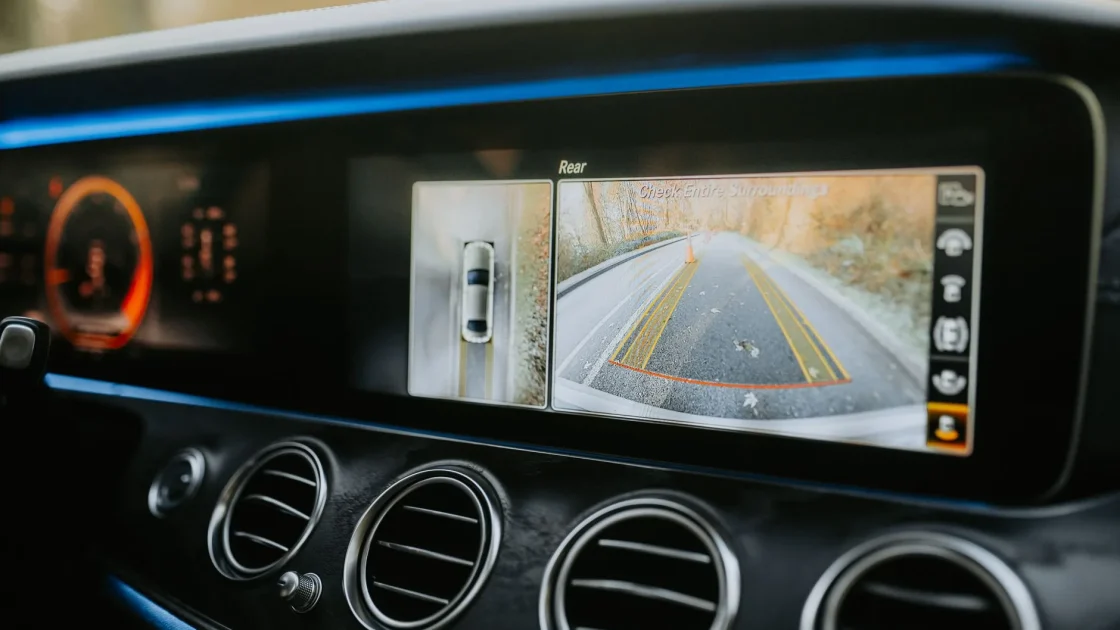
What the display shows you narrows the problem fast, so start there before you touch anything.
A completely black or blue screen usually means the camera is getting no signal, which points at power, wiring, or a fuse rather than the lens. A frozen or scrambled image points at a wiring or connector fault. A blurry, milky, or foggy picture almost always means the lens itself is dirty or has moisture inside. And an image that looks fine but has lost its colored guideline overlays is a software or calibration issue, not a hardware failure.
Sorting the symptom first saves you from cleaning a lens when the real problem is a ten-cent fuse, or chasing wiring when a wipe would have fixed it.
Tip
Black screen: think power and fuses. Fuzzy image: think dirty or wet lens. Missing guidelines: think software. Match the fix to the symptom and you skip a lot of guessing.
Clean the lens first, always
The camera lens lives at the back of your car, right in the path of road spray, mud, salt, and whatever the car ahead kicks up. It gets filthy, and a filthy lens produces exactly the blurry, washed-out image people mistake for a failing camera.
Find the lens, usually near the license plate, the trunk handle, or the tailgate badge, and clean it gently with a microfiber cloth and a little plain water or glass cleaner. Do not scrub with anything abrasive, because the lens cover scratches. I have brought back dozens of “broken” cameras with nothing but thirty seconds and a soft cloth.
If the image is foggy in a way that cleaning the outside does not fix, moisture may have gotten inside the housing. That is common on older cameras where the seal has aged. A camera full of condensation usually needs replacing, but confirm the outside is truly clean first. The same cleaning logic applies across all your sensors, and the guide on cleaning ADAS sensors the right way covers what is safe and what will damage a lens coating.
Check the fuse and the reverse trigger
If the screen is black, not blurry, the camera may simply not be getting power or a signal to turn on. Two cheap things cause this more than anything.
First, the fuse. Most backup cameras run off a fuse, sometimes shared with the reverse lights. Pull your owner’s manual, find the right fuse, and check it. A blown fuse is a two-dollar fix that people pay shops to find.
Second, the reverse signal. On many cars the camera only powers up when the transmission tells it you are in reverse, often through the same circuit as the reverse lights. If your reverse lights are out, the camera may be out for the same reason. Check that those bulbs work. If they do not, fixing them may bring the camera back too.
-
Clean the lens
Wipe the rear lens with a microfiber cloth and mild cleaner. This fixes most blurry-image complaints on the spot.
-
Check the camera fuse
Use the manual’s fuse diagram to find and inspect the backup camera fuse. Replace it if it is blown.
-
Test the reverse lights
If your reverse lights are dead, the camera trigger may be too. Fix the lights first and recheck the screen.
-
Inspect the connector
Where accessible, check the camera’s connector for corrosion or a loose fit. Reseat it and try again.
Watch out
Do not rely on a working backup camera as your only check when reversing. Cameras have blind spots low to the ground and to the sides. Turn your head and use your mirrors regardless of what the screen shows, especially around children and pets.
When the guidelines disappear but the picture stays
Sometimes the camera image is perfectly clear, but the colored parking lines that bend as you steer have vanished, or a static image shows with no dynamic overlay. That is not a broken camera. That is the software layer that draws the guides, and it can drop out after a battery disconnect, a module reset, or a system glitch.
A full drive cycle or a proper reset often restores the overlay. Because a battery disconnect is a common trigger, it is worth understanding how these resets behave, which the guide on whether disconnecting the battery resets ADAS explains. If your camera feeds into a wider suite of assist features and several went quiet at once, the broader troubleshooting in the driver assist not available fix is a good next stop.
When it is a real camera or wiring failure
If the lens is clean, the fuse is good, the reverse lights work, and the connector is solid, but the screen stays black or scrambled, you are likely looking at a failed camera or a damaged wire. This is more common on vehicles where the harness runs through a tailgate hinge that flexes every time you open it, eventually cracking a wire.
At that point the fix is testing the harness for continuity and, if the wiring is intact, replacing the camera module. A backup camera is inexpensive on many models, though luxury and 360-degree systems cost considerably more. This is also where a shop with a scan tool earns its keep, because some cameras need to be recognized and configured after replacement.
Since the federal government has required rear visibility systems on new passenger vehicles for years, this is treated as a safety item, not a luxury. The National Highway Traffic Safety Administration explains the rear visibility rule and why it exists: NHTSA rearview cameras.
Work it in order and you will solve most backup camera trouble in your own driveway: read the symptom, clean the lens, check the fuse and reverse trigger, reseat the connector, and only then suspect the camera or wiring. The cheap fixes cover the majority of cases, and you will know you tried them before anyone charges you for a diagnosis.
Frequently asked questions
A black screen usually means the camera is getting no power or no signal, rather than a dirty lens. Start with the camera fuse, which is often shared with the reverse lights, and check that your reverse lights actually work. If the fuse is good and the reverse lights work, inspect the connector and wiring, since a harness that flexes with the tailgate can crack over time.
A blurry or foggy image is almost always a dirty lens. Find the lens near your license plate or tailgate and clean it gently with a microfiber cloth and mild cleaner, avoiding anything abrasive. If cleaning the outside does not help and the fog looks like it is inside the lens, moisture has likely gotten into the housing and the camera needs replacing.
Missing guideline overlays are a software issue, not a broken camera. The lines are drawn by the display software, which can drop out after a battery disconnect, a module reset, or a glitch. A full drive cycle or a proper reset usually brings them back, and if not, the display module may need to be re-initialized with a scan tool.
The car is mechanically safe to drive, but you lose an important rear-visibility aid, and on newer vehicles a working camera is a required safety feature. Reverse carefully using your mirrors and by turning to look, especially near children and pets. Get the camera fixed promptly, since low obstacles are exactly what it is designed to catch.
Keep reading
Related guides
How to Clear an ADAS Warning Light
The master reset order for any ADAS light: read it, clean it, cycle it, then reset before you ever pay a shop.
Read guide
Reset Steering Angle Sensor at Home
The driveway relearn some cars accept, the scan-tool reset others demand, and how to tell them apart.
Read guide
Fix ADAS Errors After a Dead Battery
Why a jump start lights up half your dash, and the driveway steps that bring the systems back.
Read guide