Forward Collision Warning Light, Explained
The car-with-waves symbol and why your front collision system goes dark in bad weather.

Key takeaways
- Forward collision warning uses front radar and a camera to watch the car ahead and ready the brakes.
- An amber light usually means the front sensor is blocked by ice, mud, snow, or a caked emblem.
- A flashing light with a chime is a live alert that you are closing on the car ahead too fast.
- Clean the grille and bumper area, drive a cycle, and if it stays on, suspect calibration or a fault.
You are driving along and a symbol pops up: a car with waves radiating off the back of it, or two cars nose to tail, glowing amber. Maybe a message says the pre-collision system is unavailable. Your stomach drops, because this is the system that is supposed to stop you from rear-ending someone. Did it break?
Almost certainly not. I have chased this exact light across dozens of makes, and the answer is nearly always the same: something is blocking the front sensor. Forward collision warning is one of the most valuable safety features on your car, and it is also one of the easiest to accidentally blind.
Here is what the light means, why it appears, and how to get your front safety net back.
What the forward collision light means
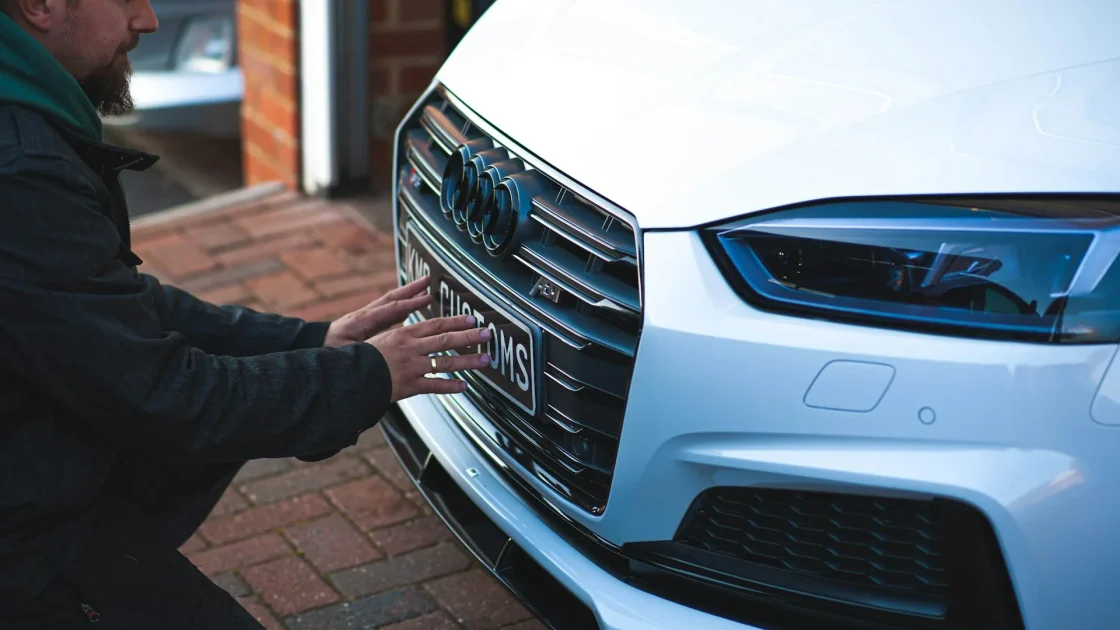
This feature watches the road ahead using a radar unit hidden behind your grille or bumper, usually paired with the camera on your windshield. It measures the gap to the car in front and how fast that gap is closing. When you approach too quickly, it warns you, and on many cars it pre-charges the brakes.
A flashing light with a loud chime is the live warning. You are closing on the vehicle ahead fast enough that the car thinks you might not be paying attention. Brake, and it goes quiet. That is the system earning its keep.
A steady amber light, or a “pre-collision unavailable” message, is the one that confuses people. It means the system has turned itself off because it cannot see clearly. The car will not guess about something as serious as automatic braking, so if the sensor is compromised, it shuts the feature down and tells you.
Note
Forward collision warning only alerts you. Automatic emergency braking actually applies the brakes. Many cars bundle both, so the same amber light can disable your warning and your auto-braking at once. That is why it is worth clearing promptly.
Warning versus automatic braking
It helps to know exactly which feature you have, because the same symbol covers a range of behavior. Some cars only warn: they flash and beep, and it is entirely up to you to hit the brakes. Others add automatic emergency braking, which steps in and slows or stops the car if you do not react in time. Plenty of modern cars run both, layered together.
Why does the distinction matter for the light? Because when that amber warning appears, you may be losing more than an alert. On a car with bundled features, one blocked sensor can switch off the warning chime and the automatic braking in the same moment. The full explainer on how automatic emergency braking works shows how the two features share the same radar and camera, which is why they tend to fail together.
The practical takeaway is simple. Do not assume the car will catch a mistake for you while this light is on. Treat every function tied to that front sensor as offline until you clear it.
Why the light turns amber
The front radar sits low and forward, right where the road throws everything at it. That location is the whole reason this light is so common.
Ice and snow pack are the top offenders in winter. A thin crust over the radar behind the emblem is enough to blind it. In summer, it is a layer of dead bugs, mud from a dirt road, or road salt film. I have wiped a “faulty” collision system back to life with a wet rag more times than I can count. The guide on the radar sensor behind the bumper shows exactly where to look on most cars.
Heavy rain and dense fog also trigger it. The radar can handle a lot, but a wall of water or fog scatters the signal, and the car errs on the side of caution. That warning clears once conditions improve. If your car specifically flags the radar, the piece on the clean front radar message walks through why it shows and what to do.
Some cars hide the radar behind the front emblem itself, and a chrome or painted badge caked in grime blocks it. The overview of the front grille emblem and hidden radar is worth a read if you cannot find the sensor.
What to check first
Before you worry about a fault, run this quick list. It resolves the large majority of forward collision lights.
- Clear any snow, ice, mud, or bug residue from the front grille, lower bumper, and emblem.
- Look for a stone chip or physical damage to the bumper right in front of the radar.
- Wipe the windshield where the forward camera sits, since it works with the radar.
- Note whether it started right after bad weather, a car wash, or a bumper repair.
The people at MyCarDoesWhat, a driver-education project, keep a clear primer on how forward collision warning behaves if you want an independent explanation: MyCarDoesWhat forward collision warning.
How to clear it
Once the sensor is clean, the system usually needs a short drive to re-check itself.
-
Clean the sensor area thoroughly
Front grille, lower bumper, and emblem. Use plain water and a soft cloth, and make sure nothing is stuck over the radar.
-
Drive at road speed for a few miles
The system re-scans the road and, if the block is gone, restores the feature. The amber light goes out on its own.
-
Reset if it lingers
If the light stays after cleaning and driving, a stored code may be holding it on. The steps to fix a front radar blocked message cover the reset options.
Watch out
While this light is on, assume you have no automatic braking and no forward collision alert. Leave extra following distance and do not test the system on purpose. It told you it is off for a reason.
When it is not just dirt
If the sensor is spotless and the light will not clear, two things top my list. First, a recent bumper repair or front-end collision. Even a light tap can knock the radar’s aim off, and a radar pointed a few degrees wrong reads the road incorrectly and shuts down. The guide to ADAS calibration after a bumper repair explains why re-aiming is required.
Second, an actual sensor or wiring fault, which a scan tool will confirm by pulling the stored code. That is the point to hand it to a shop rather than keep guessing.
So keep the order simple. Clean the front end, drive a cycle, and only think about calibration or a scan if you recently repaired the bumper or the light refuses to leave. Do that and you will have your forward safety net back, usually without spending a dime.
Frequently asked questions
It means your car's forward collision system has something to report. A flashing light with a chime is a live warning that you are approaching the car ahead too quickly. A steady amber light or a pre-collision unavailable message means the system turned itself off, usually because the front radar or camera is blocked and cannot see clearly.
The front radar sits low behind the grille or bumper, right where snow, ice, and road salt collect. Even a thin crust over the sensor is enough to blind it, so the car disables the feature and shows an amber light. Clear the ice and snow from the front end, drive a few miles, and it usually clears itself.
Yes, the car drives normally and is safe. What you lose is the collision alert and, on many cars, the automatic braking that shares the same sensor. Leave more following distance than usual and stay attentive until you have cleaned the sensor and cleared the light.
It can. The forward radar is often mounted behind the bumper or grille, so a repair or even a minor impact can shift its aim. A radar that is pointed a few degrees off reads the road wrong and shuts the system down. After bumper work, the sensor usually needs recalibration to clear the light for good.
Keep reading
Related guides
Lane Assist Unavailable Message Decoded
When the car stops nudging you between the lines, it is usually because it cannot see them.
Read guide
Steering Assist Reduced: What It Means
When the car says steering assist is reduced, it is usually protecting a system, not warning of a steering failure.
Read guide
Lane Keep Assist Light Flashing Green
A green flashing lane keep assist light is usually good news, but the color and rhythm change what it is telling you.
Read guide